Poletje čas za oddih...poletje čas za sonce, plažo in ribolov. Na otok se rad vračam in vedno gledam na morje kje so ribiči, kje kdo lovi ribe.. Kmalu za tem, ko prispem na otok me domačin pokliče na pijačo. Seveda že vem kaj me čaka... Ponavadi je to "štelanje" interneta, servisiranje kakšnega izvenkrmnega motorja, preklop klime iz zimskega v poletni režim itd itd.. Skratka enostavne reči vendar nekaterim komplicirane..
Tokrat me je domačin pričakal s štiri konjskim izvenkrmnim motorjem Yamaha 4..
Kaj je narobe?
"Ne pali.. neće da pali"...
ok.. vzamem motor in ga odpeljem v malo delavnico ki jo imam zraven hiške.
Takoj ko sem dvignil "pokrov" motroja sem videl, da je v velikih količinah prisoten pesek ter sol.
Najprej sem snel cevko goriva ter preveril če po njej prihaja gorivo. Nato sem odvil vijak na šalčki (slika levo), ki je namenjen drenaži "vode". Takoj sem opazil, da je uplinjač "umazan".
Ko sem to prekontroliral sem se lotil uplinjača..
Uplinjač ali po domače "karburator" je na motor pritrjen z dvema vijakoma.
Ta dva vijaka se nahajata pod plastičnim pokrovčkom.
Ko sem vijake odstranil sem odstranil tudi pletenico (zajlo) za dodajanje plina (gas).
Na uplinjaču sem najprej odstranil spodnji del (šalčko) v kateri je bilo kup usedlin (soli in peska).
Z nitro razredčilom in čopičem sem očistil kovinske dele.
Nato sem z izvijačem odvil tudi mešalne igle (šobe) po katerih doteka gorivo v prostor kjer se gorivo zmeša z zrakom in nastane "meglica".
Vse šobe sem spihal "na usta" ter jih očistil v nitro razredčilu. Šobe se nahajajo (slika levo) v tisti sredinjski luknjici ter pod gumijastim pokrovčkom zraven.
Uplinjač sem nato ponovno sestavil in namestil na samo ohišje motorja.
Dvakrat sem "napumpal" gorivo in motor je takoj vžgal.
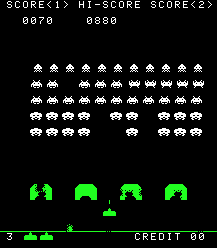
"Stari znanci in novi obrazi" bi lahko poimenoval igro "Gotof je", original so leta 1978 razvili na Japonskem pod imenom "Space invaders".. Cilj igre je zelo enostaven..
V vlogi "osvoboditelja" moramo "eliminirati" nasprotnike, ki nas ogrožajo.
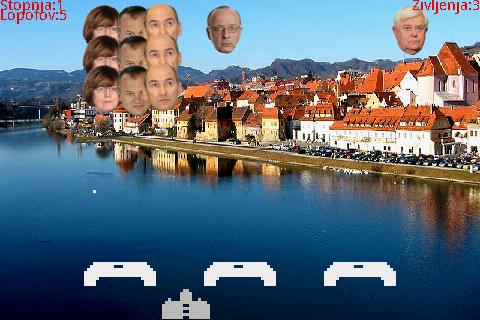
Ker je trenutno stanje v Sloveniji "rožnato - posejano s cvetlicami, ki nikoli ne zacvetijo" in ker je kapljico čez rob sprožil g.Kangler sem se pač odločil, da v ta namen priredim igro in jo preimenujem v "gotof je"..
V tej igri nastopajo nekateri "posebneži", ki v veliki meri grenijo, otežujejo, korumpirajo, zavajajo, nategujejo, zlorabljajo slovensko ljudstvo..
Sama igra je narejena za aparate - telefone s operacijskim sistemom Android. Dosegljiva je preko googlove trgovine "http://play.google.com" ali preko direknte povezave "GOTOF JE"..
Novica o igri je bila objavljena tudi na slovenskem radiju 1 , spletnem portalu zurnal24.si , spletni strani Regional Obala ter lokalnem časopisu "Mandrač" za kar se jim seveda zahvaljujem...
Še nekaj zaslonskih posnetkov prirejene igre "Gotof je"...
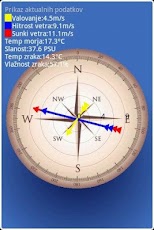
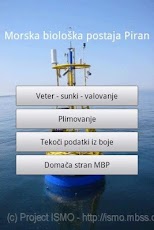
Due to the broad interest of many users of Java ME applications for displaying the data of Oceanographic buoy Vida (OceanBuoyPiran) and tides (TideKP) and also in text format (WAP), which were released in 2007, I have recently prepared an application for mobile devices running Android.
Application MBP can be obtained on the Android Market by searching the keywords "mbp" or "mbp vida" or directly on this link:
https://play.google.com/store/apps/details?id=org.mbp&feature=search_result#?t=W251bGwsMSwyLDEsIm9yZy5tYnAiXQ
Special thanks also go to Mr. Mavricij Bizjak and the colleagues from Marine Biology Station Piran of the National Institute of Biology for the comments that have been welcomed in the development of the application.
Hello everyone!
I would like to show how to design a custom UI element for Android the "Horizontal Number Spinner".
The final result looks like this:
Background images I have used:
Gray background
Glass background (9-patch)
Arrow
1.) Create a custom component which extends View and implement GestureDetector.OnGestureListener interface
package si.in2.ui;

import android.content.Context;
import android.graphics.Bitmap;
import android.graphics.BitmapFactory;
import android.graphics.Canvas;
import android.graphics.Color;
import android.graphics.Paint;
import android.graphics.drawable.Drawable;
import android.util.AttributeSet;
import android.util.Log;
import android.util.TypedValue;
import android.view.GestureDetector;
import android.view.MotionEvent;
import android.view.View;
import android.widget.Scroller;

public class HorizontalNumberSpinner extends View implements
  GestureDetector.OnGestureListener {

 public static final int ARROW_BORDER = 10;
 public static final int BOTTOM_BORDER = 10;
 public static final int MARKER_DIFFERENCE = 8;
 public static final int TEXT_BORDER = 10;
 public static final int TEXT_HEIGHT = 10;
 public static final int TOP_BORDER = 10;
 private Bitmap arrowBitmap;

 private Paint arrowPaint;
 private Paint fontPaint;
 private Paint markerPaint;
 private Paint backgroundPaint;
 private Paint smallMarkerPaint;

 private GestureDetector gestureDetector;
 private OnChangeListener onChangeListener;
 private Scroller scroller;

 private Drawable backgroundBitmap;
 private int arrowOffset;
 private int bottomBorder;
 private int currentX;
 private int firstMarkerIndex;
 private String labelFormat;

 private int lastMarkerIndex;
 private int markerDifference;

 private int markerSpacing;
 private int maxScrollOffset;
 private double maxValue;
 private int minScrollOffset;
 private double minValue;

 private int scaleDivisions;
 private double scaleStep;
 private int scrollOffset;


 private double step;
 private int stepInPixels;
 private int textBorder;
 private int textHeight;
 private int topBorder;

 //interface for event handling
 public  interface OnChangeListener {
  public  void onValueChanged(String pString, double pDouble);
 }

 public HorizontalNumberSpinner(Context ctx) {
  super(ctx);
  init(ctx);

 }

 public HorizontalNumberSpinner(Context ctx,
   AttributeSet pAttributeSet) {
  super(ctx, pAttributeSet);
  init(ctx);

 }

 public HorizontalNumberSpinner(Context ctx,
   AttributeSet pAttrSet, int p) {
  super(ctx, pAttrSet, p);
  init(ctx);

 }


 private void getArrowOffset() {
  this.arrowOffset = (getMeasuredWidth() - this.arrowBitmap.getWidth() - (int) TypedValue
    .applyDimension(1, 10.0F, getResources().getDisplayMetrics()));
 }

 private int getMaxScrollOffset() {
  return (int) Math.ceil((this.maxValue - this.minValue)
    * this.scaleDivisions * this.markerSpacing / this.scaleStep);
 }

 private int getMinScrollOffset() {
  return (int) Math.ceil(this.minValue * this.scaleDivisions
    * this.markerSpacing / this.scaleStep);
 }

 /**
  * init
  * @param ctx
  */
 private void init(Context ctx) {
  //
  scroller = new Scroller(ctx); //This class encapsulates scrolling
  gestureDetector = new GestureDetector(this);  //Detects various gestures and events using the supplied MotionEvents

  topBorder =  (int)TypedValue.applyDimension(1, 10, getResources().getDisplayMetrics());
  bottomBorder = (int) TypedValue.applyDimension(1, 10, getResources().getDisplayMetrics());
  markerDifference = (int) TypedValue.applyDimension(1, 8,getResources().getDisplayMetrics());
  textHeight = (int) TypedValue.applyDimension(1, 10, getResources().getDisplayMetrics());
  textBorder = (int) TypedValue.applyDimension(1, 10, getResources().getDisplayMetrics());

  //default values
  minValue = -200000;
  maxValue = 1000000;
  scaleStep = 1000;
  step = 100;
  scaleDivisions = 5;
  arrowOffset = 200;
  markerSpacing = 16;
  labelFormat = "%10.3f";
  stepInPixels = (int) ((step *  scaleDivisions *  markerSpacing) / scaleStep);
  maxScrollOffset = getMaxScrollOffset();
  minScrollOffset = getMinScrollOffset();

  //Log.i("SPINER", "maxScrollOffset: " + maxScrollOffset);
  //Log.i("SPINER", "minScrollOffset: " + minScrollOffset);

  //Here we set the background image
  this.backgroundBitmap = getResources().getDrawable(R.drawable.sp_bg_3);

  //copy the arrow bitmap into variable arrowBitmap
  this.arrowBitmap = BitmapFactory.decodeResource(
    getContext().getResources(), R.drawable.spinner_pointer).copy(
    Bitmap.Config.ARGB_8888, true);


  //get the arrow offset.
  getArrowOffset();

  //Setup paint objects for
  initPaintObjects();

 }

 private void initPaintObjects()
 {
  markerPaint = new Paint(Paint.ANTI_ALIAS_FLAG);
  markerPaint.setColor(Color.WHITE);
  markerPaint.setStrokeWidth(3);
  markerPaint.setStyle(Paint.Style.FILL);

  smallMarkerPaint = new Paint(Paint.ANTI_ALIAS_FLAG);
  smallMarkerPaint.setColor(Color.WHITE);
  smallMarkerPaint.setStrokeWidth(1.0F);
  smallMarkerPaint.setStyle(Paint.Style.FILL);
  smallMarkerPaint.setTextAlign(Paint.Align.CENTER);
  smallMarkerPaint.setTextSize(10);

  fontPaint = new Paint(Paint.ANTI_ALIAS_FLAG);
  fontPaint.setStyle(Paint.Style.STROKE);
  fontPaint.setColor(Color.WHITE);
  fontPaint.setStrokeWidth(1);
  fontPaint.setAntiAlias(true);
  fontPaint.setTextSize(12);
  fontPaint.setTextAlign(Paint.Align.CENTER);

  backgroundPaint = new Paint(Paint.ANTI_ALIAS_FLAG);

  arrowPaint = new Paint();

  }


 private int measureHeigth(int height) {
  View.MeasureSpec.getMode(height);
  return View.MeasureSpec.getSize(height);
 }

 private int measureWidth(int width) {
  View.MeasureSpec.getMode(width);
  return View.MeasureSpec.getSize(width);
 }

 private void notifyListener() {

  if (this.onChangeListener != null) {
   double d = getValue();
      //fire event
   onChangeListener.onValueChanged(String.format(this.getFormat(), d), d);
  }
 }

 private void scrollToSelectableValue() {

  int val = Math.round(this.scrollOffset / this.stepInPixels) * this.stepInPixels;
  scroller.startScroll(scrollOffset, 0, val - this.scrollOffset, 0);
  Log.i("SPINER", "scrollToSelectableValue val="+ val +"," + scrollOffset);
  post(new Runnable() {
   public void run() {
    if (!scroller.isFinished()) {
     postDelayed(this, 20);
     invalidate(); //correct the value on the spinner
     return;
    }
   }
  });
 }


 @Override
 public boolean onDown(MotionEvent paramMotionEvent) {
  Log.i("SPINER", "onDown: ");

  scroller.abortAnimation();
  scrollToSelectableValue();

  return true;
 }

 @Override
 public void onDraw(Canvas pCanvas) {

  //check if the scroller is not finished
  if (scroller.isFinished() == false)
  {
   scroller.computeScrollOffset();
   scrollOffset = scroller.getCurrX(); //get the scroller currnet x value
   notifyListener();
  }

  this.backgroundBitmap.setBounds(0, 0, getMeasuredWidth(),getMeasuredHeight());
  this.backgroundBitmap.draw(pCanvas);

  //calcukate curentx, first and last marker index...
  this.firstMarkerIndex = ((-this.scrollOffset - this.arrowOffset) / this.markerSpacing);
  this.firstMarkerIndex -= (this.scaleDivisions - this.firstMarkerIndex) % this.scaleDivisions;
  this.currentX = (this.arrowOffset + this.markerSpacing * this.firstMarkerIndex + this.scrollOffset);
  this.lastMarkerIndex = ((-this.scrollOffset - this.arrowOffset + getMeasuredWidth()) / this.markerSpacing);
  this.lastMarkerIndex += this.scaleDivisions - this.lastMarkerIndex % this.scaleDivisions;

  int chk = firstMarkerIndex;
  while(true) {
   if (chk > lastMarkerIndex) {
    pCanvas.drawBitmap(arrowBitmap,
      arrowOffset - (arrowBitmap.getWidth() / 2), 0.0F,
      backgroundPaint);
    return;
   }

   if (chk % scaleDivisions == 0) {
    double d =  (chk / scaleDivisions) * scaleStep;

    //draw the leading line
    pCanvas.drawLine(currentX, topBorder, currentX,
      getMeasuredHeight() - bottomBorder - textHeight
        - textBorder, markerPaint);

     //draw text below the leading line
    pCanvas.drawText(String.format(labelFormat, d), currentX, getMeasuredHeight() - bottomBorder, fontPaint);

     currentX +=  markerSpacing;

   } else {
    //lines between leading lines
    pCanvas.drawLine(currentX, topBorder, currentX,
      getMeasuredHeight() - bottomBorder - textHeight
        - textBorder - markerDifference,
      smallMarkerPaint);
    currentX +=  markerSpacing;
   }

   chk++;
  }

 }

 @Override
 public boolean onFling(MotionEvent pMotionEvent1,
   MotionEvent pMotionEvent2, float x, float y) {
  Log.i("SPINER", "onFling: " + x + ", " + y );
  scroller.fling(this.scrollOffset, 0, (int) x,
    (int) y, -this.maxScrollOffset,
    -this.minScrollOffset, 0, 0);
  //start a thread and after 20msec verify if scroller is finished then repaint object..
  post(new Runnable() {
   public void run() {
    if (!scroller.isFinished()) {
     invalidate();
     postDelayed(this, 20);
    } else {
     scrollToSelectableValue();

    }
   }
  });
  return false;
 }


 protected void onMeasure(int w, int h) {
  Log.i("SPINER", "onMeasure: " + w + ", " + h );
  int i = measureHeigth(w);
  int j = measureWidth(h);
  getArrowOffset();
  setMeasuredDimension(j, i);
 }

 public boolean onScroll(MotionEvent paramMotionEvent1,
   MotionEvent paramMotionEvent2, float x, float y) {
  Log.i("SPINER", "onScroll: " + x + ", " + y );
  this.scrollOffset = (int) (this.scrollOffset - x);

  if (this.scrollOffset < -this.maxScrollOffset) {
   this.scrollOffset = -this.maxScrollOffset;
  }
  invalidate();
  notifyListener();
  return true;

 }

 @Override
 public void onShowPress(MotionEvent pMotionEvent) {
  return;
 }

 @Override
 public boolean onSingleTapUp(MotionEvent pMotionEvent) {
  return false;
 }

 @Override
 public boolean onTouchEvent(MotionEvent pMotionEvent) {
  if ((pMotionEvent.getAction() == MotionEvent.ACTION_UP) && (this.scroller.isFinished()))
   scrollToSelectableValue();
  this.gestureDetector.onTouchEvent(pMotionEvent);
  return true;
 }

 public void setBackgroundBitmap(Drawable pDrawable) {
  this.backgroundBitmap = pDrawable;
 }

 public void setFormat(String format) {
  this.labelFormat = format;
 }

 public void setMaxValue(double mValue) {
  this.maxValue = mValue;
  this.maxScrollOffset = getMaxScrollOffset();
 }

 public void setMinValue(double minValue) {
  this.minValue = minValue;
  this.minScrollOffset = getMinScrollOffset();
  this.maxScrollOffset = getMaxScrollOffset();
 }

 public void setOnChangeListener(OnChangeListener pOnChangeListener) {
  this.onChangeListener = pOnChangeListener;
 }

 public void setScaleDivisions(int i) {
  scaleDivisions = i;
  minScrollOffset = getMinScrollOffset();
  maxScrollOffset = getMaxScrollOffset();
 }

 public void setScaleStep(double d) {
  scaleStep = d;
  step = d /  (2 * scaleDivisions);
  stepInPixels = (int) ((step * scaleDivisions *  markerSpacing) / d);
  minScrollOffset = getMinScrollOffset();
  maxScrollOffset = getMaxScrollOffset();
 }

 public void setValue(double d) {
  scrollOffset = (int) ((-d *  (scaleDivisions * markerSpacing)) / scaleStep);
  invalidate();
  scrollToSelectableValue();
 }

 public String getFormat() {
  return this.labelFormat;
 }

 public double getMaxValue() {
  return this.maxValue;
 }

 public double getMinValue() {
  return this.minValue;
 }

 public int getScaleDivisions() {
  return this.scaleDivisions;
 }

 public double getScaleStep() {
  return this.scaleStep;
 }

 public double getStep() {
  return this.step;
 }

 public double getValue() {
  return ( (-scrollOffset) * scaleStep)
    /  (scaleDivisions * markerSpacing);
 }

 @Override
 public void onLongPress(MotionEvent arg0) {
  // TODO Auto-generated method stub
 return;

 }
}
2.Android Layout file
3. HorizontalSpinnerActivity file
In the "main" activity we initialize our HorizontalSpinner with some values:
package si.in2.ui;

import android.app.Activity;
import android.os.Bundle;

import android.widget.LinearLayout;
import android.widget.TextView;

public class HorizontalSpinnerActivity extends Activity  {
    /** Called when the activity is first created. */

 HorizontalNumberSpinner spinner;
 LinearLayout layout;
 TextView text;

    @Override
    public void onCreate(Bundle savedInstanceState) {
        super.onCreate(savedInstanceState);
        setContentView(R.layout.main);
        text = (TextView)  findViewById(R.id.textView1);

        spinner = (HorizontalNumberSpinner)findViewById(R.id.spiner);
        spinner.setMaxValue(10000.0); // set the maximum value
        spinner.setMinValue(-10000.0);// set the minimum value
        spinner.setScaleStep(50.0); // step for 50 values
        spinner.setScaleDivisions(5); // set scale division between numbers
        spinner.setFormat("%.000f"); // set the format displayed below leading line
        spinner.setValue(5000.0); // start at value

        //event handling
        spinner.setOnChangeListener(new HorizontalNumberSpinner.OnChangeListener()
        {
          public void onValueChanged(String paramString, double paramDouble)
          {
            text.setText("Value: " + paramDouble);
          }
        });


    }


}
Reading oracle forms forum I have found out this question:
"Dears We are working with system with 2 application server IPs and one Real IP (which is able to be accessed through internet) I would like to know the URL is the user using in order to use his IP to open something else from the system. Chcking the host name not usesful because if user connect from home
using Real IP it return the AS host name which real IP redirct to it. I need to know how to get the URL of the session from the form or to know whether the user connected using the Real IP or not. (Oracle forms 10gR2)
"
The simple solution is to write down a java bean component (pjc) for Oracle Forms.
As you know the PJC must extends VBean object and also pass a IHandler instance to it.
From IHandler you can read Applet parameters like Applet.getDocumentBase. The getDocumentBase() method of Applet class returns the URL of the document in which this applet is embedded.
Below is the PJC which can read some user specific datas.
CLIENT_IP return the client ip number,
CLIENT_NAME return the name of local (client) computer
CLIENT_OS return the opetating system name
CLIENT_USER return the user name which is logged to the system
HOST_URL return the URL of the document in which the Oracle Forms application is embedded (run).
package in2.client;

import java.io.PrintStream;
import java.net.InetAddress;
import oracle.forms.handler.IHandler;
import oracle.forms.properties.ID;
import oracle.forms.ui.VBean;

public class ClientInfo extends VBean
{
  private static final ID CLIENT_IP = ID.registerProperty("CLIENT_IP");
  private static final ID CLIENT_NAME = ID.registerProperty("CLIENT_NAME");
  private static final ID CLIENT_OS = ID.registerProperty("CLIENT_OS");
  private static final ID CLIENT_USER = ID.registerProperty("CLIENT_USER");
  private static final ID HOST_URL = ID.registerProperty("HOST_URL");

  private IHandler mHandler;
  private String hostAddress = "";
  private String hostName = "";
  private String hostOs = "";
  private String hostUser = "";
  private String hostURL = "";

  public ClientInfo()
  {
    try
    {

      System.out.println("+----------------------+");
      System.out.println("+  ClientInfro PJC     +");
      System.out.println("+  Peter Valencic      +");
      System.out.println("+----------------------+\n");
Impeller is a critical part in marine engines. It is the main component
of the water pump and is used to pump fresh and cold water to the engine
cooling system. That is why it is so important to check its condition
very often. If your impeller is broken you may permanently damage your
engine because of overheating your boat engine. There is an unwritten
rule that says that you should replace your impeller on your boat engine
every two years even if it's in good condition.
First we unscrew the four screws that are visible on the side of the engines heel.
Next we have to remove the rubber plugin on the narrow end of the
engine and we unscrew the zinc protector that is located above the
propeler
We remove the zinc protector and we unscrew the number 12 bolt from the bottom side
Next we have to remove the engine heel and remove it from the boat engine
We have to buy original Yamaha impeller
Next we remove the four bolts from the water pump housing
We use a hammer to gently tap on the water pump housing to remove it (Warning: Handle with care!!)
What we see in front of us is a boat engine shaft with a small rubber propeler attached to it => that is impeller
We take the impeller of the shaft (if it won't go of we use a knife on it)
We put our newly bought original impeller on the shaft and put a small
metal plugin inside a little hole in the shaft to hold the impeller in
place
We put the water pump housing back in place and we have to wrap the impeller blades to fit inside the water pump housing
The blades must be slightly bent inside the water pump housing
We than screw everything back in its place, and before you put your
screws in you might consider lubricating them with a water resistant
lubricant
Pri nekem projektu sem naletel na potrebo po zaznavi operacijskega sistema na katerem teče podatkovna baza Oracle. Pravtako sem potreboval verzijo java prevajalnika saj sem moral uporabiti knjižnice, ki so bile prevedene s točno določenim prevajalnikom (1.5).
Pri tem primeru sem si pomagal s pl/sql funkcijo, ki pokliče statično metodo razreda java.lang.System getPropery.
Z naborom parametrov lahko tako v pl/sql-u pridobimo sledeče vrednosti (glej tabelo)
java.version
Java Runtime Environment version
java.vendor
Java Runtime Environment vendor
java.vendor.url
Java vendor URL
java.home
Java installation directory
java.vm.specification.version
Java Virtual Machine specification version
java.vm.specification.vendor
Java Virtual Machine specification vendor
java.vm.specification.name
Java Virtual Machine specification name
java.vm.version
Java Virtual Machine implementation version
java.vm.vendor
Java Virtual Machine implementation vendor
java.vm.name
Java Virtual Machine implementation name
java.specification.version
Java Runtime Environment specification version
java.specification.vendor
Java Runtime Environment specification vendor
java.specification.name
Java Runtime Environment specification name
java.class.version
Java class format version number
java.class.path
Java class path
java.library.path
List of paths to search when loading libraries
java.io.tmpdir
Default temp file path
java.compiler
Name of JIT compiler to use
java.ext.dirs
Path of extension directory or directories
os.name
Operating system name
os.arch
Operating system architecture
os.version
Operating system version
file.separator
File separator ("/" on UNIX)
path.separator
Path separator (":" on UNIX)
line.separator
Line separator ("\n" on UNIX)
user.name
User's account name
user.home
User's home directory
user.dir
User's current working directory
Funckija:
create or replace function f_vrni_parameter(p_vhodni in varchar2) return varchar2 as language java name 'java.lang.System.getProperty(java.lang.String) return java.lang.String';
Klic v pl/sql-u pa
select f_vrni_parameter('java.version') from dual
select f_vrni_parameter('os.version) from dual
Nekaj podobnih vrednosti lahko dobimo tudi v paketu DBMS_UTILITY vendar ta ni podprt pri starejših bazah podatkov